How AI Changes Game Art Outsourcing: Production Time, Costs, and What It Means for Your Project
The question lands in almost every new client conversation: “You’re using AI, so does that mean my project gets done faster? And does it cost less?”
It is a fair question, and it deserves a straight answer rather than a sales pitch. AI is generating a lot of noise in game development in 2026. Some studios treat it as a shortcut. Others dismiss it entirely. We have spent the past year doing something more useful: integrating it into our production pipeline, measuring the results task by task, and being direct with clients about what it actually changes and what it does not.
We’ve been building games and game art for over eight years, across 100+ projects for 89 clients. AI is now a genuine part of how we work, not a feature we’ve bolted on. This article shares what we’ve actually learned from integrating AI into our art pipeline, with real numbers and honest analysis.
The short answer: AI-assisted art production delivers measurable speed gains on specific task types. For clients, this means faster iteration cycles and more production capacity at similar budgets. It does not eliminate the need for skilled artists. It changes what they spend their time on.
What We Actually Measured
We don’t publish numbers we can’t back up. The figures below come from our internal production tracking across projects where we integrated AI-assisted tools into the art pipeline. These are task-specific measurements, not studio-wide averages.
Art Task | Speed Improvement |
Props production | Up to 80% faster |
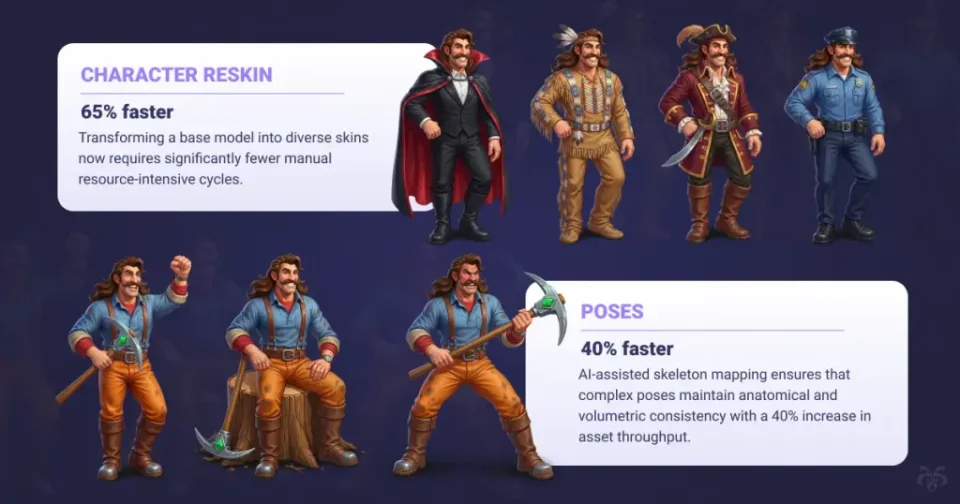
Character reskinning | 65% faster |
Character rendering | 50% faster |
Pose creation | 40% faster |
Overall manual art workload | Up to 60% reduction |
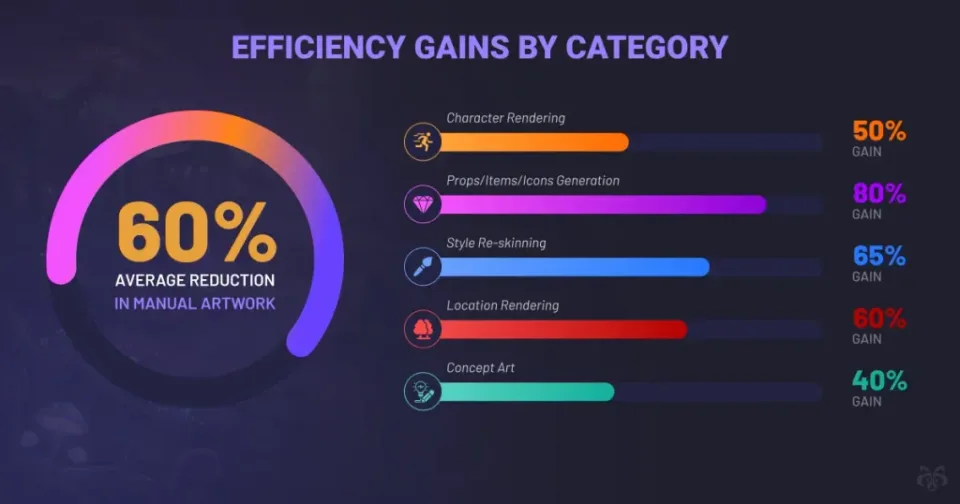
The gains are real, but they are concentrated. They show up most clearly in what we call “production repetition” tasks: reskinning a character across multiple variants, generating pose references, producing prop iterations from a base asset, creating texture variations. These are tasks that used to consume significant artist hours but do not require the creative judgement that defines the quality of the work.
Where the Speed Comes From
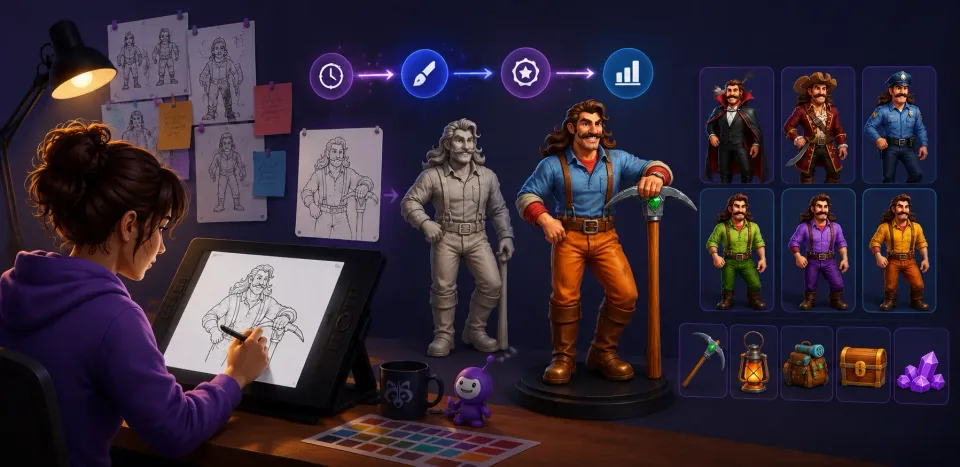
A character reskin that previously took a full day now takes a few hours. Props that required a week of production time can be delivered in two. That is not AI replacing the artist. It is AI handling the mechanical repetition so the artist can focus on the decisions that actually matter.
The GDC 2025 State of the Game Industry report found that 52% of studios now work at companies that have implemented generative AI tools. The adoption is real. What separates studios that benefit from it and those that don’t is whether AI is integrated into the production workflow or just used for occasional ideation.
What Has Not Changed
Creative direction, style consistency, and quality validation are still entirely human. AI does not understand your game’s visual identity, your target audience, or why a character needs to feel a certain way. Every AI-assisted output at Whimsy Games goes through artist review and refinement before it leaves our pipeline.
The honest version: AI makes the boring parts faster. It does not make the hard parts easier.
Need Game Art Outsourcing?
AI + Expert Artists
Let’s TalkContact us
The Tool That Changed Our Pipeline: ABrush.AI
Part of integrating AI into a professional production environment is finding tools that actually fit how artists work, not just tools that demo well.
One that has made a genuine difference for us is ABrush.AI, an AI plugin for Adobe Photoshop developed by AB Games. It is built specifically for production art workflows, not for generating standalone images from scratch. That distinction matters more than it might seem.
Why a Photoshop-Native Tool Works for Production
Most AI image generation tools exist outside the artist’s primary workspace. The workflow becomes: generate something elsewhere, import it, fix it in Photoshop. That is not acceleration. It is just adding steps and handoff friction.
ABrush.AI works inside the environment where our artists already operate. It handles repetitive production tasks, including variant generation, reskinning, and texture iteration, without pulling artists out of their workflow. AI assistance becomes a natural part of the production process rather than a parallel one.
What It Does Not Do
It does not generate game-ready assets from a text prompt. It does not replace the concept phase. It does not make decisions about style, tone, or visual identity. What it does is reduce the mechanical labour on tasks that are well-defined and repetitive, which is exactly where AI assistance is most valuable in a professional art pipeline.
This is the pattern we have found across every AI tool we have evaluated. The ones that work in production are the ones that fit around skilled artists rather than attempting to replace them. As we covered in our analysis of how AI is disrupting the video game industry in 2026, 97% of developers now use AI tools for asset creation in some form. The question is not whether to use AI. It is whether you are using it in a way that actually improves output.
What This Means for Your Project Timeline
The practical question for any client is: how does this affect my delivery schedule? The honest answer is that it depends on what you are building. AI-assisted production has the most impact on specific project types and phases.
Where You Will See the Biggest Gains
High-volume asset production. If your project requires a large number of similar assets, this is where AI assistance compounds fastest. Take Meegos Mayhem, the chaotic multiplayer party game we built with obstacle course racing, ragdoll physics, and ever-changing maps. That project involved a substantial icon and UI asset library: power-ups, game tokens, racing assets, currency icons, character outfit variants, and multiple location sets. The sheer volume of production-repetition work across those asset types is exactly where AI-assisted tools cut delivery time most meaningfully.
Character variant and reskin work. For ZiggyVerse, a turn-based strategy RPG where players build teams of unique creatures for 3v3 tactical battles, we handled a full roster of distinct monster characters, each with their own visual identity, elemental variants, and evolution states. Managing that volume of character differentiation at quality is precisely the kind of challenge where AI-assisted reskinning and variant generation saves weeks, not hours.
Iteration cycles. One of the most expensive things in any outsourcing relationship is revision time. When art direction needs to shift mid-project, AI-assisted tools allow us to generate variants and alternatives far faster than traditional methods. Feedback rounds move quicker, and the project absorbs direction changes more efficiently.
UI libraries and seasonal updates. For VanLife, a Match 2 game with full-cycle art, gameplay systems, and a van customisation loop, we produced a complete set of UI elements, boosters, power-up icons, and world map assets. When a game has a consistent visual style and needs that style applied across a large number of assets in multiple states, AI assistance is transformative.
Where the Gains Are Smaller
Not every phase of a project benefits equally.
- Concept art and original character design. The creative phase, defining what a character looks like and establishing the visual language of a world, still requires full human creative investment.
- Complex 3D modelling. Topology, rigging, and engine optimisation are still largely manual processes. AI tools are improving here, but the gains are less dramatic than in 2D production workflows.
- Style-critical first assets. The first character in a new project, the hero environment, the UI kit that sets the visual identity: these require the most careful human attention. They set the standard everything else is measured against.
What clients typically see: On projects with significant production volume, AI-assisted pipelines deliver 30 to 50% faster turnaround on the production phase specifically. The concept and integration phases are largely unchanged.
What AI Does (and Does Not) Do to Outsourcing Costs
This is the question clients most want a straight answer to, so here it is.
AI-assisted production does not automatically make outsourcing cheaper in the way most people expect. What it changes is the value equation: you get more production output for the same budget, rather than the same output for less money.
This is not a subtle distinction. It is the core of how AI actually changes the economics of game art outsourcing.
The Scope Expansion Effect
When our artists spend 60% less time on mechanical repetition, that time does not disappear. It gets redirected into quality refinement, additional asset variants, faster iteration on client feedback, and more complex work within the same timeline.
In his Forbes Business Council article, Denys Kliuch wrote directly about this: studios assuming AI simply cuts bills are often the ones that end up disappointed. As he put it, AI should amplify, not replace. The real transformation is scope expansion. A project budget that previously delivered a defined asset set can now deliver significantly more at the same cost.
A concrete example from our work: on the Meegos Re-make project, we reworked the full UI/UX across the lobby, customisation, shop, and reward screens, including character skins and outfits, loot box rarity tiers, daily quests, and Golden Pass reward screens. That volume of UI variant work, applied consistently across a redesigned visual system, is exactly the kind of scope that AI-assisted production absorbs without a proportional increase in delivery time.
Where Clients Do See Direct Cost Savings
There are real cost benefits, but they show up in specific places:
- Revision rounds. Generating alternatives and iterations is faster, which means revision cycles cost less time and therefore less money.
- Reskinning and variant work. This is where AI delivers the clearest direct cost reduction. Tasks previously priced as significant additional scope can now be handled at a fraction of that cost.
- Deadline-sensitive projects. If your project has a hard deadline and would otherwise require additional artists to hit it, AI-assisted production can absorb that pressure without adding headcount.
What Does Not Change
Quality work still costs what quality work costs. If you are asking for original concept art, complex 3D characters, or a distinctive visual style that requires significant creative development, AI does not compress those costs meaningfully.
The studio’s expertise is still the product. AI tools in the hands of experienced artists produce better results than the same tools in the hands of less experienced ones. You are not buying access to AI. You are buying the judgement of 75 professionals who know how to use it effectively.
The practical framing for budget conversations: If your project has a defined asset list, AI-assisted production means you can extend that list without a proportional budget increase. If your project is primarily creative development, the cost picture is largely unchanged.
For a full breakdown of what game art outsourcing costs across asset types and regions, our complete guide to game art outsourcing covers the numbers in detail. This article is specifically about the AI layer on top of those fundamentals.
How to Evaluate Whether a Studio’s AI Claims Are Real
AI has become a selling point across the outsourcing industry. Every studio is now “AI-powered” in some capacity. The problem is that most of these claims are vague, and vague AI claims tell you nothing useful about what your project will actually look like.
Here is what to ask when evaluating a studio that says it uses AI in its pipeline.
Four Questions That Reveal Real AI Integration
“Which specific tasks does AI assist with in your pipeline, and which does it not?” A studio with genuine integration names exact tasks: reskinning, pose generation, texture variation, prop iteration. If the answer is vague (“we use AI throughout our process”), the integration is surface-level.
“Can you show me before-and-after examples from AI-assisted production on a project similar to mine?” Real results are demonstrable. The quality between AI-assisted and traditionally produced work should be indistinguishable. If a studio cannot show this, they are not using AI at a production level.
“How do you validate AI-generated elements before delivery?” This is the question most clients forget to ask. Every AI output should go through artist review. Without a clear validation process, AI-generated artefacts, inconsistent lighting, incorrect proportions, style drift, make it into final assets. Ask specifically: who reviews it, at what stage, and what the rejection criteria are.
“Who owns the training data your AI tools are built on, and does using them affect our IP?” This is a legal and ethical question that matters more than most studios admit. The answer tells you whether the studio has thought seriously about AI governance or is just using consumer tools.
The Red Flag to Watch For
Studios that lead with dramatic cost cuts as the primary AI benefit should be approached carefully. As Denys Kliuch noted in his Forbes piece, the reputational damage from poor AI-generated art can far outweigh any cost savings. The Call of Duty: Black Ops 6 loading screen incident, where an AI-generated zombie Santa appeared with six fingers, became a case study in how visible AI shortcuts are to players.
Our approach: We are transparent with clients about where AI tools are active in their project and where they are not. As Jackie Jin, CEO at SquidGames, put it after nearly two years working with us: “I was very impressed by Whimsy’s transparency, communication and quick turnaround time.” That transparency extends fully to how and where AI is used in the pipeline.
To understand the full scope of what our AI game development services cover beyond art production, the services page has the detail.
Building Your Next Game?
Let’s Plan It Together
Get in TouchContact us
What AI Actually Changes About the Creative Partnership
Most articles about AI in game art outsourcing frame it as a binary: either AI makes everything faster and cheaper, or it is a threat to artists’ jobs. Neither framing is useful for a client trying to plan a project.
Here is what we actually tell clients when they ask.
AI Does Not Replace the Creative Relationship
The value of working with an experienced outsourcing studio has never been purely about production speed. It is about the creative partnership: the studio that asks the right questions about your game’s visual identity, that pushes back when a direction is not working, that brings ideas you did not think to ask for.
Ben Fairbank, Executive Managing Director at a gaming provider we work with, described it this way: “Their ability to not only deliver great work but also provide suggestions and solutions to potential problems by understanding and analyzing the project deeply, was highly appreciated.” That kind of analytical engagement with a client’s project is entirely human. AI does not touch any of it.
What Changes Is What Artists Focus On
We have seen this shift clearly in our own team. When artists are not spending hours on mechanical reskinning tasks, they spend that time on things that require judgement: refining character expressions, solving visual consistency problems across a large asset set, experimenting with stylistic approaches before committing to production.
The result, from a client’s perspective, is that the creative quality of the work tends to improve alongside the speed increase. Not because AI is making better creative decisions, but because artists have more time to make better creative decisions.
This is visible across the range of projects we work on. For Puzzle Fight: PvP Wars, a mid-core battler that blends match-3 mechanics with real-time PvP combat in a fantasy world, maintaining visual coherence across hero squads, battlegrounds, and UI states requires sustained creative attention. For NightFall, a 3D fantasy adventure built in Unreal Engine with a detailed immersive environment and a cast of charismatic characters, the creative development work is irreducibly human. AI-assisted production freed up capacity for that creative work to receive the attention it needed.
The GDC data is worth noting here. While 52% of studios have implemented AI tools, the GDC 2025 report also found that 30% of developers believe AI is having a negative impact on the industry. The concern is not unfounded. AI without human curation produces mediocrity at scale, which is why the studios getting the most value from it are the ones that use it as a precision tool, not a shortcut.
Working With Us
If you are evaluating outsourcing partners and want to know exactly how AI-assisted production would apply to your project, which tasks it would accelerate, where it would not change anything, and what the realistic timeline and cost picture looks like, that is a conversation we are good at having.
We do not give a generic pitch. We look at your asset list, your timeline, and your brief, and we tell you honestly where AI tools add value and where they do not. That transparency is something clients consistently mention. Silas Reinagel, Founder at Enigma Dragons, described working with us as “highly organised, great communicators, and a wide range of skills to help you build the game you want.” Jackie Jin, CEO at SquidGames, put it simply: “I was very impressed by Whimsy’s transparency, communication and quick turnaround time.”
Get in touch with the Whimsy Games team and tell us what you are building. We will give you a straight answer.

Written by
Anton ParamonovChief Product Officer
I am the Chief Product Officer at Whimsy Games, where my extensive background in engineering, management, and game analytics shapes my approach to product strategy and development. My experience, gained at leading game development studios, is a cornerstone in driving our projects from conception to market. My responsibilities extend to ensuring that our games not only meet our high creative and technical standards but also align with market demands, driving the success of Whimsy Games in a highly competitive industry.